

Lexmark Clinical Assistant
 | Parts |
Brochure here |
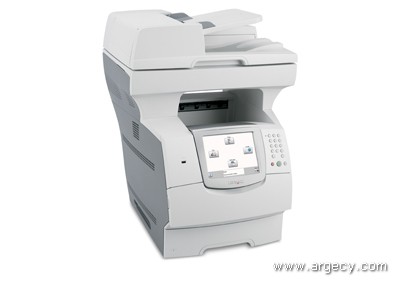
Lexmark Clinical Assistant
Add an extra set of hands to nursing stations with an integrated multifunction product workflow solution for healthcare
The Clinical Assistant includes all the functions of a Lexmark X646dte monochrome laser multifunction product (MFP) plus embedded applications to simplify healthcare workflow processes. The unique capabilities of the Clinical Assistant are easily accessed via four user-friendly icons on its intuitive eTask touchscreen interface. These icons allow clinical staff to complete complicated, time-consuming processes with a single touch, increasing productivity and giving them back valuable time to focus on quality patient care. In addition to providing time-saving workflow solutions, the Lexmark Clinical Assistant prints at speeds up to 50 pages per minute and also includes copy, scan and fax capabilities.
Includes embedded applications to simplify healthcare workflow processes.
Integrate directly with leading electronic medical records (EMR) solutions; use the 'Scan to EMR' icon to securely scan and route documents to pre-determined network destinations.
With 'Scan to EMR', reduce turnaround time because supporting documentation for insurance claims is easily accessible.
Includes an integrated 'Orders Routing' solution that allows nursing staff and clinicians to securely route physician orders and automatically separate STAT, or urgent, and normal orders with the touch of an icon.
Physician 'Order Routing' works with Lexmark's Queue & View? order management solution, an optional server-based application that allows pharmacists to view and manage orders online.
With 'Card Copy' solution, scan each side of the card and print both sides in an enlarged format on one side of a single sheet of paper with one touch of the icon on the Lexmark eTask interface.
Quickly and easily access 'Forms' with one touch of the icon through the Lexmark eTask interface, making it easy to choose and then print selected documents.
Lexmark's Embedded Solutions Framework (eSF) allows these Java-based applications to run directly on the Clinical Assistant, saving customers the expense of additional servers.
*This system is not designed, marketed or sold for use as a medical device or for diagnosis.
Scan to electronic medical records (EMR)
EMR systems help reduce errors because patient information is stored electronically, allowing physicians to quickly access critical information. The Clinical Assistant can integrate directly with leading EMR solutions, or the 'Scan to EMR' icon can be used to securely scan and route documents to pre-determined network destinations. Leading healthcare organizations use document imaging to complement computerized electronic medical records, providing access to more online patient information. Lexmark's Clinical Assistant can be placed at nursing stations, close to clinical staff, so that they can easily scan in time-sensitive patient updates, increasing their productivity and ensuring that critical information is entered into the patient's EMR in a timely fashion. These documents can also help reduce turnaround time for accounts receivable because supporting documentation for insurance claims is easily accessible.
Physician order routing
Improving the medication order process is a top priority in virtually every healthcare organization. Most organizations today are in the process of adopting Computerized Provider Order Entry (CPOE); however, for organizations that have not fully implemented CPOE or need a CPOE backup system, fax machines are still commonly used to send handwritten physician's orders to the pharmacy or a lab for processing. This process breaks down easily leading to lost or delayed orders.
The Clinical Assistant includes an integrated 'Orders Routing' solution that allows nursing staff and clinicians to securely route physician orders and automatically separate STAT, or urgent, and normal orders with the touch of an icon. The Clinical Assistant also integrates with leading medication order management systems and works with Lexmark's Queue & View? order management solution, an optional server-based application that allows pharmacists to view and manage orders online.
Lexmark's Queue & View? solution is driven by patient barcodes and accessed via secure Web browsers to streamline processes and helps to meet Joint Commission on Accreditation of Healthcare Organizations and Health Insurance Portability and Accountability Act mandates for patient safety and privacy.
Card copying
Patient insurance or identification cards are copied frequently and included with patient files. However, because the cards are typically two-sided, medical staff must go through an extra step and make two separate photocopies - one of both the front and the back of the card.
Lexmark's solution allows staff to scan each side of the card and print both sides in an enlarged format on one side of a single sheet of paper. The 'Card Copy' function is easily accessed with one touch of an icon on the Lexmark eTask interface on the Clinical Assistant, saving time, as well as paper, and making a frequently used process much more efficient.
Forms on demand
Many healthcare facilities are moving away from expensive pre-printed forms and storing frequently accessed documents online for printing on demand. This approach saves money and avoids compliance issues associated with using outdated forms. However, clinical staff do not have time to perform the extra steps required to log in to a workstation, locate the document via Web browser and submit a print job.
Lexmark's solution allows clinical staff to quickly and easily access those 'Forms' with the touch of an icon through the Lexmark eTask interface on the Clinical Assistant, making it easy to choose and then print selected documents. This solution provides the benefits of online access, without the hassle of the extra steps required to locate and print frequently used documents from an online repository.
Laser Toner/Print Cartridge
X644H01A High Yield Toner Cartridge for X642, X644e, X646e
New
x644h01a Compatible 21K Page yield (New)
$119.00
X644X11A Extra High Yield Print Toner Cartridge For T640 T642 T644 X642 X644 X646
New
X644X11A Compatible 32K Page yield (New)
$149.00
New
x644h01a Compatible 21K Page yield (New)
$119.00
New
X644X11A Compatible 32K Page yield (New)
$149.00
Connectivity
Flash, SDRAM Memory
Furniture
Paper Handling
Service Parts
User Replaceable Parts
 | ||||
| ||||
| ||||
| ||||
|
| |||
| ||||
| Print Technology | Monochrome Laser |
| UNSPSC Code | 43.21.21.10 |
| Network Printing Methods | LPR/LPD Direct IP (Port 9100) Socket (Raw TCP/IP) IPP (Internet Printing Protocol) HTTP NDS Queue-based Printing NDPS/NEPS (Novell Distributed Print Services, Novell Netware Enterprise Print Services) Enhanced IP (Port 9400) FTP, TFTP |
| Network Protocol Support | TCP/IP IPv4 IPX/SPX AppleTalk? LexLink (DLC) TCP/IP IPv6 |
| TCP/IP Set of Application Services | Zero configuration DDNS, mDNS NTP: Network Time Protocol ping, finger, telnet TFTP |
| Network Management Protocols | HTTP HTTPs (SSL/TLS) SNMPv1, SNMPv2c SNMPv3 WINS SLPv1 IGMP BOOTP, RARP APIPA (AutoIP) DHCP ICMP DNS |
| Network Security | SSL* Enabled Embedded Web Server SNMPv3 TCP/IP port access control Authenticated and encrypted MarkVision Professional communication 802.1x Authentication: MD5, MSCHAPv2, LEAP, PEAP, TLS, TTLS IPSec *This product includes software developed by the OpenSSL Project for use in the OpenSSL Toolkit. |
| Function | Color Scanning Copying Faxing Network Scanning Printing |
| Supplies: Functions only with replacement cartridges designed for use in the United States and Canada | . |
| Print Speed (A4, Black): Up to | 48 ppm |
| Print Speed (A4, Black) Duplex: Up to | 36 spm |
| Print Speed (Letter, Black): Up to | 50 ppm |
| Print Speed (Letter, Black) Duplex: Up to | 37 spm |
| Time to First Page (Black) as fast as | 8.5 seconds |
| Copy Speed (Letter, Black): Up to | 50 cpm |
| Print Resolution, Black | 1200 Image Quality 1200 x 1200 dpi 2400 Image Quality 600 x 600 dpi |
| Specified Operating Environment | Temperature: 16 to 32?C (60 to 90?F) Humidity: 8 to 80% Relative Humidity Altitude: 0 - 3048 Meters (10,000 Feet) |
| Processor | 533 MHz |
| Memory, Standard | 256 MB |
| Expandable Memory Options | Yes |
| Apple Macintosh Operating Systems Supported | Apple Mac OS X Apple Mac OS 9.x |
| Microsoft Windows Operating Systems Supported | Microsoft Windows 2000 Microsoft Windows NT (4.00/4.00 Server) Microsoft Windows Me Microsoft Windows XP Microsoft Windows Server 2003 Microsoft Windows 98 2nd Edition Microsoft Windows XP x64 Microsoft Windows Server 2003 running Terminal Server Microsoft Windows 2000 Server running Terminal Services Microsoft Windows Server 2003 x64 Edition Microsoft Windows Server 2003 x64 Edition running Terminal Services Microsoft Windows Vista Microsoft Windows Vista x64 |
| Citrix MetaFrame | Citrix, MetaFrame and MetaFrame XP are registered trademarks or trademarks of Citrix Systems, Inc. in the U.S. and other countries. Microsoft Windows 2000 Server running Terminal Services with Citrix MetaFrame XP Presentation Server or Citrix MetaFrame Presentation Server 3.0. Microsoft Windows Server 2003 running Terminal Server with Citrix MetaFrame XP Presentation Server or Citrix MetaFrame Presentation Server 3.0 Microsoft Windows 2000 Server running Terminal Services with Citrix Presentation Server 4.0 Microsoft Windows Server 2003 running Terminal Server with Citrix Presentation Server 4.0 Microsoft Windows Server 2003 x64 Edition (Standard, Enterprise) running Terminal Server with Citrix Presentation Server 4.0 |
| Linux Operating Systems Supported | Red Flag Linux Desktop 4.0, 5.0 Linpus Linux Desktop 9.2, 9.3 Red Hat Enterprise Linux WS 3.0, 4.0, 5.0 SUSE Linux Enterprise Server 8.0, 9.0, 10.0 SUSE Linux Professional 9.1, 9.2, 9.3 Debian GNU/Linux 3.1, 4.0 Linspire Linux 5.0 |
| Novell Operating Systems Supported | Novell? Open Enterprise Server for Netware with NDS, iPrint or Novell Distributed Print Services (NDPS) Novell NetWare? 3.2, 4.2 (bindery) Novell NetWare 4.2, 5.x and 6.x (NDS) Novell NetWare 5.x, 6.x with iPrint or Novell Distributed Print Services (NDPS) |
| Other Operating Systems Supported | IBM iSeries or IBM AS/400? Systems with TCP/IP with OS/400? V3R1 or later using OS/400 Host Print Transform Virtually any platform supporting TCP/IP |
| UNIX Operating Systems Supported | Sun Solaris SPARC 8, 9, 10 HP-UX 11.00, 11.1 IBM AIX 5.1, 5.2, 5.3 Sun Solaris x86 10 |
| Web Browsers for Embedded Web Server | Microsoft Internet Explorer 5.x, 6.x Netscape Navigator 6.x, 7.x Apple Mac OS X Safari 1.0 Mozilla FireFox 1.0 |
| Paper Handling Standard | 500-Sheet Drawer 500-Sheet Duplex Unit 500-Sheet Output Bin 500-Sheet Input Tray 100-Sheet Multipurpose Feeder |
| Paper Input Capacity (Standard) | 1100 pages 20 lb or 75 gsm bond |
| Paper Input Capacity (Maximum) | 3100 pages 20 lb or 75 gsm bond |
| Paper Output Capacity (Standard) | 500 pages 20 lb or 75 gsm bond |
| Paper Output Capacity (Maximum) | 500 pages 20 lb or 75 gsm bond |
| Copy/Fax/Scan (ADF) Paper Input Capacity : Up to | 50 pages 20 lb or 75 gsm bond |
| Finishing Option? | No |
| Number of Paper Inputs | 3 |
| Number of Paper Inputs, Maximum | 4 |
| Media Types Supported | Card Stock Dual Web Labels Envelopes Integrated Labels Paper Labels Plain Paper Polyester Labels Transparencies Vinyl Labels Refer to the Card Stock & Label Guide |
| Media Sizes Supported | 10 Envelope 7 3/4 Envelope 9 Envelope A4 A5 DL Envelope Executive Folio JIS-B5 Legal Letter Statement Universal |
| Supplies Yield | 10,000*-page Print Cartridge 21,000*-page High Yield Print Cartridge 32,000*-page Extra High Yield Print Cartridge Ships with 21,000*-page High Yield Return Program Print Cartridge *Average standard page yield value declared in accordance with ISO/IEC 19752. |
| Standard Ports | Ethernet 10/100BaseTX (RJ-45) One Internal Card Slot USB Compatible with USB 2.0 Specification USB Direct interface on Operator Panel |
| Optional Network Ports | Lexmark N4050e 802.11g Wireless Print Server (Print Only) Internal MarkNet? N8020 GigaBit Ethernet Internal MarkNet? N8050 802.11g Wireless Internal MarkNet? N8030 Fiber Fast Ethernet |
| Product Certifications | Energy Star, CSA, ICES Class A, BSMI Class A, VCCI Class A, FCC Class A, UL 60950-1, IEC 320-1, ECMA-74, CE Class A, CB IEC 60950 1, IEC 61000-3-2, -3-3, EN 55022, EN 55024, GS (TÜV)-EN 60950-1, SEMKO, UL AR, CS, TÜV Rh, N Mark, C-tick Class A, CCC Class A, RPC, PSB, MIC, EK - K60950 |
| Product Warranty | One Year OnSite Repair |
| Fonts and Symbol Sets | 3 of 9 scalable PCL 5e fonts in Narrow, Regular and Wide 158 scalable PostScript fonts 2 PCL bitmap fonts 39 scalable PPDS fonts 5 PPDS bitmap fonts 84 scalable PCL fonts OCR-A, OCR-B scalable PCL 5e fonts For more information, refer to the Technical Reference. |
| Printer Languages (Standard) | PCL 5e Emulation PCL 6 Emulation Personal Printer Data Stream (PPDS) PostScript 3 Emulation PDF 1.5 xHTML |
| Reduce / Enlarge Range | 25 - 400 % |
| Scan Area, Maximum | 8.5 x 14 inches |
| Modem Speed | 33.6 Kbps |
| Packaged Size (" - H x W x D) | 57.6 x 29.9 x 26.5 in. |
| Size (" - H x W x D) | 35 x 22 x 26 in. |
| Weight (kg) | 46.6 kg |
| Weight (lbs) | 102.8 lb. |
| Packaged Weight (kg) | 55.9 kg |
| Packaged Weight (lbs) | 123.02 lb. |
| Noise Level, Idle | 30 dBA |
| Print Noise Level, Operating | 56 dBA |
| Copy Noise Level, Operating | 62 dBA |
| Scan Noise Level, Operating | 59 dBA |
| Duty Cycle: Up to | 225,000 one-time maximum Impressions per month |