
Brother MFC-L2720DW MFP Laser Printer - Toner, Parts & Supplies
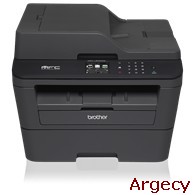
Brother MFC-L2720DW
New
MFCL2720DW (New)
Features
- One-year limited warranty.
- Fast! Print and copy up to 30ppm.
- Built-in wireless & Ethernet networking.
Looking for Brother MFC-L2720DW Parts?
Abstract
Compact Laser All-in-One with Wireless Networking and Duplex Printing
The Brother MFC-L2720DW is a reliable, affordable monochrome laser all-in-one with an up to 35-page automatic document feeder for home or small office use. This desk-friendly, compact all-in-one has an up to 250-sheet capacity tray, connects with ease via wireless networking or Ethernet, and prints and copies at up to 30ppm. 2.7" color TouchScreen Display for intuitive menu navigation. Print from compatible mobile devices over your wireless network. Scan documents to a variety of destinations, including popular cloud service. High-speed faxing. Automatic duplex printing. 1-year limited warranty plus free phone support for life of your product.
? Brother Cloud Apps Scan to Office, Easy Scan to E-mail Cloud Services (Web Connect) GOOGLE DRIVE/GOOGLE DRIVE for Business, ONENOTE, BOX/BOX for Business, EVERNOTE /EVERNOTE Business, ONEDRIVE/ONEDRIVE for Business, DROPBOX/DROPBOX for Business Mobile Device Compatibility AirPrint , Google Cloud Print, Brother iPrint&Scan, Cortado Workplace, Wi-Fi Direct One-Push Wireless Setup AOSS, Wi-Fi Protected Setup Optional Interface(s) Standard Interface(s) Wireless 802.11 b/g/n, Ethernet, 10/100 Base-TX Ethernet, Wi Fi Direct, Hi-Speed USB 2.0 Standard Network Features Printing, Scanning, PC Fax Send/Receive Supported Network Protocols (IPv4) ARP, RARP, BOOTP, DHCP, APIPA (Auto IP), WINS/NetBIOS Name Resolution, DNS Resolver, mDNS, LLMNR Responder, LPR/LPD, Custom Raw Port/Port 9100, IPP, FTP Server, SNMPv1/v2c/v3, HTTP Server, TFTP Client and Server, SMTP Client, ICMP, Web Services (Print/Scan), SNTP Client, POP3, IMAP4 Supported Network Protocols (IPv6) NDP, RA, DNS Resolver, mDNS, LLMNR Responder, LPR/LPD, Custom Raw Port/Port 9100, IPP, FTP Server, SNMPv1/v2c/v3, HTTP Server, TFTP Client and Server, SMTP Client, ICMPv6, Web Services (Print/Scan), SNTP Client, POP3, IMAP4 Wi-Fi Certified Yes
Black Copy Speed (max. ppm) 30 Copy Capability Black and White Copy Resolution 600 x 600 max. dpi Design Style Flatbed Duplex Copying No ID Copy Yes N in 1 Functions 2in1 / 4in1 Poster Function No Reduction/Enlargement 25%-400% Sorting Function Yes Stand-Alone Copying Yes
Unit Dimensions (W" x D" x H"] 16.1" x 15.7" x 12.5" Unit Weight (lbs) 25.4 Carton Width 20.4" Carton Height 16.75" Carton Length 22.3" Carton Weight 30.9 lbs
Auto Fax Receive Date/Time Header Yes Broadcasting (Number of Locations) 250 Call Waiting/Caller ID/Distinctive Ring Read No/Yes/Yes Document Memory Backup Yes External TAD Interface Yes Fax Modem Speed 33.6K bps Faxing Capability Black and White Fax/Telephone Switch Yes Out-of-Paper Reception Yes PC Fax Capability (Send/Receive) Yes Total Auto Dial Locations 208
LCD Display 2.7" Color Touchscreen Maximum Monthly Duty Cycle 10,000 printed pages Optional Memory Recommended Monthly Print Volume 250 to 2,000 pages Standard Memory (MB) 64 Toner Save Mode Yes
Automatic Document Feeder Capacity (max. pages) 35 Duplex Printing Capability Yes Manual Feed Capacity (sheets) 1 Maximum Automatic Document Feeder Capacity 35 Maximum Input for ADF (Width/Height) 8.5"/14" Minimum Input for ADF (Width/Height) 5.8"/5.8" Output Paper Capacity (sheets) 100 Paper Handling Size - Manual Feed Letter, Legal, Executive, A4, A5, A6, B5, B6, Envelope, Custom Sizes (3.0-8.5" (w), 5.0-14 (l)) Paper Handling Size - Paper Tray Letter, Legal, Executive, A4, A5, B5 Recommended Paper Brands Xerox 4200DP 20 lb., Hammermill Laser Paper 24 lb., Avery Laser Label #5160 Sheet Weight - ADF (Min/Max) 17-24 lbs. Sheet Weight - Manual Feed (Min/Max) 16-43 lbs. (bond) Sheet Weight - Paper Tray (Min/Max) 16-28 lbs. (bond) Sorting Function Yes Standard Paper Input Capacity (sheets) 250
ENERGY STAR Certified Yes Machine Noise (Ready/Copying) 30 dB / 50 dB Operating Environment: Humidity 20-80% (w/out condensation) Operating Environment: Temperature 50-90 F Power Source AC 120V 50/60Hz
Black Print Speed (max. ppm) 30 Consumable Type Toner Cartridge and Drum Duplex Printing Standard Yes Emulation(s) PCL6 First Page Out Time (max. sec.) 8.5 Print Resolution (max. dpi) 2400 x 600 dpi Print Technology B/W Laser Printer Driver Compatibility Windows, macOS
Duplex Scanning No Included Software Nuance PaperPort SE with OCR for Windows, Presto! PageManager with OCR for Mac Interpolated Scan Resolution (max. dpi) 19200 x 19200 dpi Mobile Device Scanning App Brother iPrint&Scan Optical Scan Resolution (max. dpi) 600 x 2400 dpi (flatbed); 600 x 600 dpi (ADF) Scan Drivers Included TWAIN, WIA, ICA, SANE Scan File Formats JPEG (JPG), PDF Single-page/Multi-page (PDF/A, High Compression PDF, TIFF Single-page/Multi-page (TIF), Windows Bitmap (BMP), MAX, Portable Network Graphics (PNG), XML Paper Specification (XPS) "Scan To" Feature E-mail, Image, OCR, File, E-mail Server (download), FTP, SharePoint Scanning Capability B/W and Color
Main Features
- Fast printing and copying. Help improve your productivity with print and copy speeds of up to 30ppm and produce professional output at up to 2400 x 600 dpi.
- Flexible paper handling. Features an adjustable, 250-sheet capacity paper tray for letter or legal size paper. Plus, a single-sheet manual feed slot for envelopes, labels or thicker media.
- Versatile, high-quality color scanning. Offers an up to 19200 x 19200 dpi (interpolated) resolution and a variety of "scan to" functions including: E-mail, file, image, OCR and SharePoint (PC).
- Flexible connectivity. Built-in wireless 802.11b/g/n and Ethernet network interfaces for sharing with multiple users on your network or connect locally to a single computer via its USB interface.
- Convenient mobile device printing & scanning. Print from your mobile device via AirPrint, Google Cloud Print, Brother iPrint&Scan, Cortado Workplace and Wi-Fi Direct. Plus, wirelessly scan to your mobile device with the Brother iPrint&Scan app.
- Easily produce two-sided output. Print professional two-sided documents and booklets using the automatic duplex printing feature. Also, create two-sided output from one-sided originals when copying and faxing. This feature helps to reduce paper use and saves money.
- Straight-through paper path. A manual feed slot and rear paper exit provide a straight-through paper path to ensure that all of your printed materials always look their best.
- 2.7" Color TouchScreen Display Offers intuitive navigation and easy scanning to popular cloud services including DROPBOX, GOOGLE Drive, EVERNOTE ONENOTE and more
- At your side support. Free online, call or live chat support for the life of your product.
Supplies & Accessories
| Name | Part # | |
|---|---|---|
| Standard-yield Toner, Black - approx. 1,200 pages | 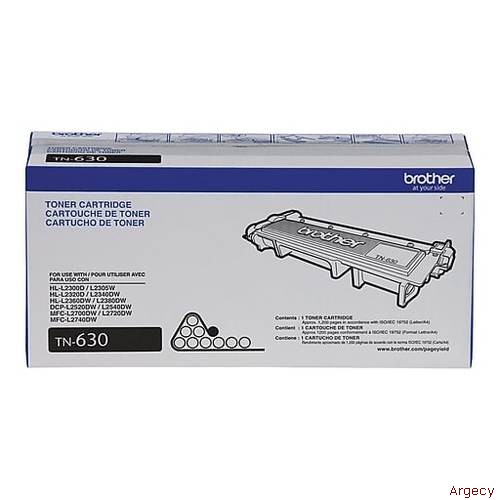 TN630 | |
| High-yield Toner, Black - approx. 2,600 pages | 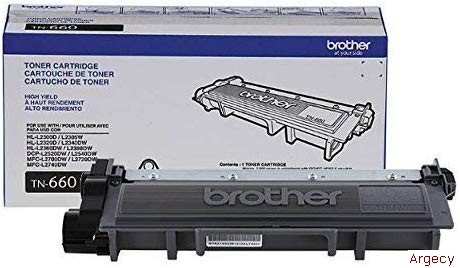 TN660 | |
| Drum Unit - approx. 12,000 pages | 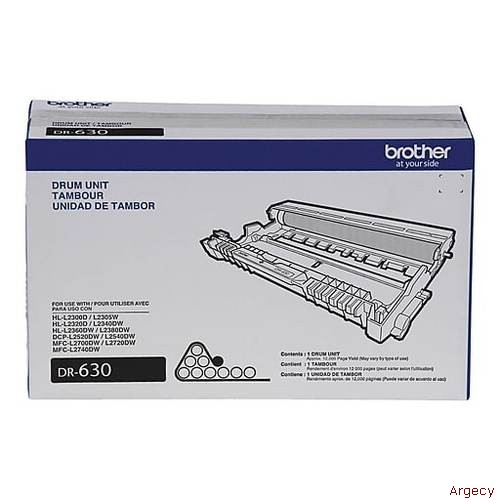 DR630 |
Specifications
Security Features
What's Included
| Emulation(s) | BR-Script3 is PostScript 3 compatible |
| Maximum Monthly Duty Cycle | Maximum number of printed pages per month and can be used to compare designed durability between like Brother products. For maximum printer life, it is best to choose a printer with a duty cycle that far exceeds your print requirements. |
| Mobile Device Compatibility | Requires connection to a wireless network. AirPrint is a trademark of Apple Inc. Cortado is a trademark of Cortado AG. For more details and mobile device compatibility, visit www.connectprintshare.com |
| Recommended Monthly Print Volume | The recommended range of monthly printed pages to achieve the best possible performance and printer life. Printers are intended to handle occasional usage beyond this range with little or no effect. Consistently printing above the recommended print volume, however, may adversely affect the print quality or life of the machine. It is always best to choose a printer with an appropriate recommended print volume to allow for any anticipated increase in printing needs. |